
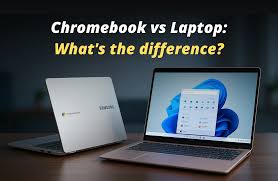
In today’s digital age, choosing the right computing device is essential. Whether you need a device for work, school, or casual browsing, understanding the difference between a Chromebook and a traditional laptop can save you time, money, and frustration.
While both devices may look similar on the surface, their operating systems, performance capabilities, and use cases set them apart. This guide explores these differences in detail, helping you make an informed decision.
What Is a Chromebook?
A Chromebook is a lightweight laptop designed primarily to run Google’s Chrome OS. Unlike traditional laptops, Chromebooks rely heavily on web-based applications and cloud storage. This design philosophy emphasizes simplicity, speed, and security. Chromebooks are ideal for users who spend most of their time online, using services like Google Drive, Gmail, and web-based productivity tools.
Chromebooks boot quickly, often in under ten seconds, and receive automatic updates from Google. Security is built-in, reducing the risk of viruses and malware. Their simplicity makes them particularly popular in education and for casual users who do not require specialized software.
What Is a Laptop?
A laptop, in the traditional sense, is a portable personal computer that runs a full-featured operating system like Windows, macOS, or Linux. Unlike Chromebooks, laptops can run a wide range of software, from productivity applications to creative programs like Photoshop, video editing suites, and gaming platforms.
Laptops come in various specifications, ranging from budget models for everyday use to high-performance machines for gaming, design, or professional work. They generally offer more storage, more powerful processors, and greater flexibility in hardware upgrades compared to Chromebooks.
Read Also: Best Water Leak Detector – Top Picks and Buying Guide
Operating System Differences
The most significant difference between a Chromebook and a laptop lies in the operating system. Chromebooks run Chrome OS, a lightweight system built around Google Chrome and web applications. Chrome OS is highly optimized for speed and efficiency, but it is limited in running traditional desktop software. Users rely on cloud services or Android apps available through the Google Play Store.
Laptops, on the other hand, run full-featured operating systems like Windows or macOS. These systems support a wide range of software, from specialized professional tools to popular entertainment applications. Windows laptops are compatible with thousands of programs, including high-end video editing and gaming software. Macs offer a tightly integrated ecosystem with macOS, ideal for creative professionals.
Performance and Hardware
Chromebooks are generally designed with efficiency in mind. They often have lower-end processors, less RAM, and limited storage because they rely on cloud computing. This makes them lightweight, portable, and energy-efficient, with battery life often exceeding 10 hours on a single charge. Chromebooks are excellent for web browsing, document editing, streaming, and other light tasks.
Laptops, by comparison, offer a wide spectrum of hardware options. You can find laptops with high-end processors, dedicated graphics cards, large RAM capacity, and extensive storage. This makes them suitable for demanding tasks like gaming, video rendering, 3D modeling, and software development. Laptops are heavier and may have shorter battery life, but they provide unmatched versatility.
Software and Application Availability
Software availability is another key distinction. Chromebooks primarily run web-based apps and Android applications. Programs like Microsoft Office, Slack, and Zoom are available through browser versions or apps, but professional software like Adobe Creative Cloud or AutoCAD is often not fully supported. This makes Chromebooks ideal for students, casual users, or professionals who rely on cloud tools.
Laptops provide full access to desktop applications. Windows and macOS users can install nearly any program compatible with their operating system. This flexibility is crucial for professionals who need specialized software, gamers who require high-performance applications, or creators who rely on resource-intensive tools.
Storage and Cloud Integration
Chromebooks are built for the cloud. They often have minimal local storage, sometimes as little as 32GB, because users are expected to store documents, photos, and files on Google Drive or other cloud services.
This approach keeps devices lightweight, affordable, and secure. Cloud integration also ensures that your files are backed up automatically, accessible from any device, and easy to share.
Traditional laptops come with significantly more local storage, ranging from 256GB to multiple terabytes. This allows users to store large files locally without relying on an internet connection. While cloud services are still supported, laptops provide more flexibility for offline work and media storage.
Security and Maintenance
Chromebooks have a reputation for robust security. Chrome OS uses automatic updates, sandboxing of apps, verified boot, and strong encryption. Users are less likely to encounter viruses or malware, making maintenance simple and worry-free. For individuals who prefer a “set it and forget it” approach, Chromebooks are ideal.
Laptops require more hands-on maintenance to ensure security. Windows laptops, in particular, are more susceptible to malware and require antivirus software, frequent updates, and occasional troubleshooting. macOS laptops offer strong security features but still demand user awareness to prevent potential threats.
Portability and Battery Life
Chromebooks often excel in portability. They are lightweight, compact, and designed for long battery life. Many models weigh less than three pounds, making them convenient for students, travelers, or anyone who carries their device frequently. The efficient hardware and lightweight operating system allow Chromebooks to achieve 10 to 15 hours of battery life in many cases.
Laptops vary widely in portability and battery life. Ultrabooks and some MacBooks are highly portable with long battery life, while gaming laptops or high-performance workstations are heavier and may last only a few hours unplugged. The tradeoff comes in performance and versatility versus mobility and simplicity.
Cost Comparison
Chromebooks are generally more affordable than laptops. Entry-level models can cost under $300, while mid-range options range from $400 to $600. Their lower price is due to simpler hardware, minimal storage, and reliance on cloud computing. Chromebooks offer an excellent balance of price and functionality for everyday computing tasks.
Laptops are available across a much broader price spectrum. Budget laptops start around $400, mid-range models fall between $700 and $1,200, and high-end laptops can exceed $2,000. The cost reflects hardware capabilities, software compatibility, and additional features such as high-resolution displays, premium build materials, and advanced graphics processing.
Use Cases: Who Should Choose a Chromebook or Laptop?
Choosing between a Chromebook and a laptop depends on your specific needs. Chromebooks are perfect for students, casual users, and anyone who relies heavily on web applications and cloud storage. They are also ideal for workplaces that use Google Workspace and require secure, easy-to-manage devices.
Laptops are suited for professionals, creatives, and gamers who need access to specialized software and high-performance hardware. They offer unmatched versatility for tasks such as video editing, software development, design work, and gaming. For users who need offline access to large files or resource-intensive programs, laptops remain the superior choice.
Conclusion
Understanding the difference between a Chromebook and a laptop is key to making the right investment for your computing needs. Chromebooks offer simplicity, portability, long battery life, and strong security, making them ideal for light computing and cloud-based work.
Laptops provide more power, flexibility, and compatibility with a wide range of software, catering to professionals, creatives, and gamers.
Ultimately, the choice depends on how you plan to use the device, your budget, and whether you prioritize portability and simplicity or power and versatility. Both Chromebooks and laptops have their strengths, and choosing the right one ensures a smooth computing experience tailored to your lifestyle.
FAQs
1. What is the main difference between a Chromebook and a laptop?
Chromebooks run Chrome OS and rely on web apps, while laptops run full operating systems like Windows or macOS.
2. Are Chromebooks better than laptops?
It depends on your needs. Chromebooks are great for cloud-based work, while laptops offer more power and software flexibility.
3. Can Chromebooks run Microsoft Office or Photoshop?
Chromebooks can run Microsoft Office online and some Android apps, but full versions of Photoshop are only available on laptops.
4. Which device has better battery life?
Chromebooks typically offer longer battery life due to lightweight hardware and Chrome OS optimization.
5. Are Chromebooks cheaper than laptops?
Yes, Chromebooks are generally more affordable, especially for basic tasks and cloud-based work.